Lunavect
Get notified when Claude Code or Codex finishes on a Mac
Long agent turns are easy to miss: you switch to another window, and the session waits for your approval for twenty minutes. There are two ways to be told when Claude Code or Codex needs you.
Claude Code’s own hooks
Claude Code can run your commands on lifecycle events with hooks — for example Notification when it needs permission or input, and Stop when it finishes a reply. You can connect them to osascript or a notification tool yourself. You then maintain the scripts, and each session only knows about itself.
Lunavect: one notification when there is something to act on
Lunavect is a free, open-source menu bar app that watches every Claude Code and Codex session on your Mac and notifies you only when it matters:
- Response ready when a reply is finished — and only once when Claude’s background commands, subagents or monitors finish, instead of after every interim reply.
- Permission needed and Awaiting input when a session waits for you.
- Errors when a turn fails, with the reason: a reached limit and when it returns, a lost connection or a sign-in problem.
- Limits when a five-hour or weekly allowance runs low, and when it comes back.
Clicking a notification opens that session in its own Terminal or iTerm2 tab or client. Sounds and banners can be switched on separately, and several completions close together share one sound.
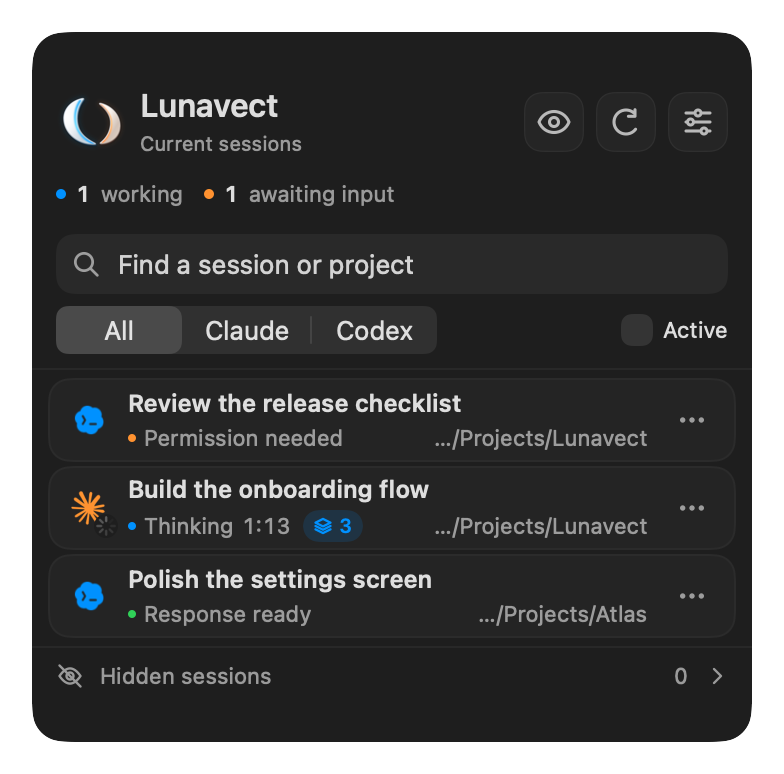
Download Lunavect · Notification settings · Session states
Common questions
Why did I get no notification while Claude kept working in the background? That is intended: a reply that leaves background tasks running is shown as In background, and the single notification arrives after the last task.
Does Lunavect replace my own hooks? No. It adds its own handlers when you connect a provider and keeps other hooks and your status line unchanged.