Lunavect
Sessions
Click Lunavect in the macOS menu bar to open the session panel. It brings Claude Code and Codex tasks into one list, with a title, project and the latest available state. Settings open separately from the panel.
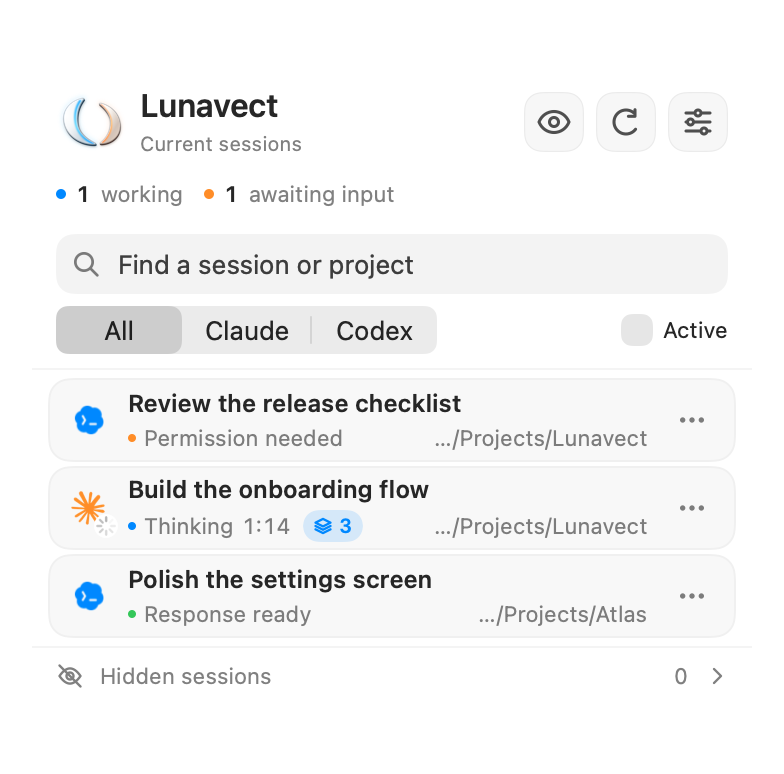
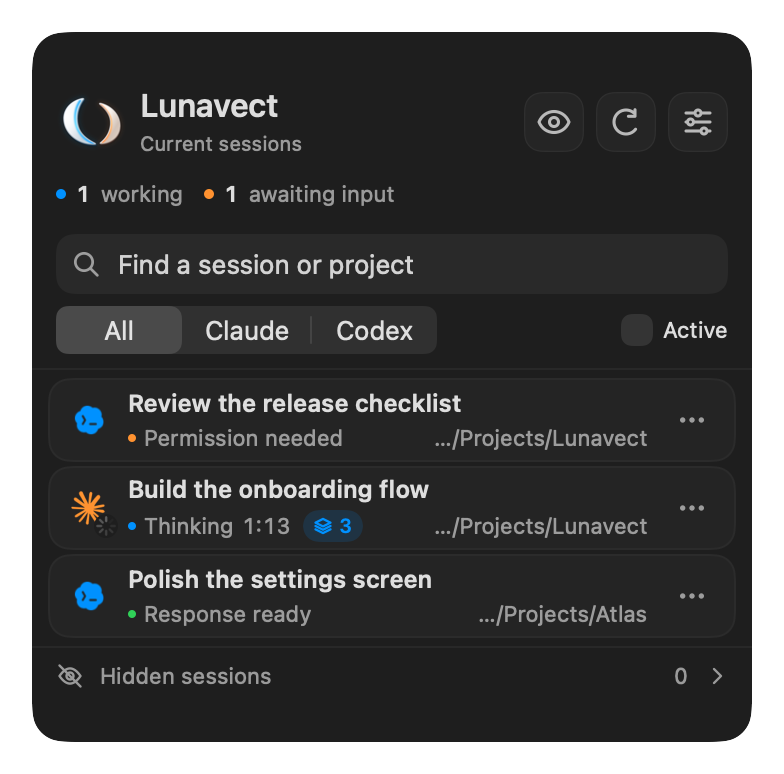
Reading a session
| State | Meaning |
|---|---|
| Working / Thinking / tool name | A source currently reports work. The timer belongs to the current response, not the session’s total lifetime. |
| In background + task count | Claude finished a reply while its own background tasks (shell commands, subagents, monitors) are still running. Claude Code wakes the session when they finish, so the task counts as working. |
| Thinking or a tool + task count | Claude is still working and has already started background tasks. |
| Compacting context | Claude’s compaction lifecycle reports work. Manual compaction has its own timer; automatic compaction retains the running response’s start. |
| Permission needed | The client is waiting for approval. Return to the client to respond. |
| Input needed | The client is waiting for input, including an MCP form or a request to open a link in the browser. |
| Response ready | A response finished; the session may still be open in its client. |
| Idle | A session is open without confirmed current work. |
| Error reason | Claude’s turn ended with an API error: limit reached, can’t reach Claude, service error, sign in again, account issue or error. See Notifications. |
| No network | The Mac has had no network connection for at least 10 seconds while the task was working. The timer keeps running; the previous status returns with the connection. |
| Unknown or stale | Lunavect does not have a sufficiently current state. This is not treated as working or finished. |
The working and awaiting-input counters summarize current states. A saved title, recent file read or an old catalog entry does not turn a task into a live session. The decorative menu-bar phrases describe an animation state, not a tool the agent has actually called.
A retained Claude background blocked entry without a live process ID, live status or fresh lifecycle event stays outside Current sessions and the awaiting-input count. Lunavect preserves its waiting phase and data; this is a product boundary for current presence, not a claim that Claude completed the task. A live wait remains current regardless of the session’s start date, and background working remains current even without a process because autonomous work can continue between process lifetimes.
Closing questions from Claude
From 0.1.2, a recognized closing decision question such as “Shall I apply these changes?” is shown as Input needed and included in the waiting count. The adapter examines the documented local Stop.last_assistant_message field; it does not read another transcript or save the response text.
This is a conservative inference from selected Russian, English and German wording, rather than confirmation of a permission dialog. Unknown wording remains Response ready. A fresh idle poll preserves the question without extending its timestamp; resumed work, explicit later states or the existing ten-minute hook freshness limit supersede it. During the running app session, once a later runtime state supersedes a question, an idle or missing catalog row cannot revive that same saved question. A later closing question is still counted. Structured permission events retain priority.
Background tasks in Claude
Claude Code reports its in-flight background work in the documented Stop.background_tasks field. When a reply ends while such tasks are still running, Lunavect keeps the session working with the status In background instead of Response ready. A small blue capsule shows the number of Claude’s background tasks whenever the session works: it grows when Claude starts a background command, subagent, monitor or workflow (PostToolUse), and is set exactly from background_tasks when a subagent finishes (SubagentStop) and at the end of each reply (Stop). A background command that finishes while Claude is still working is counted until the next of those events. The row tooltip lists commands, agents and monitors. A finished task wakes Claude again; replies to those task events stay silent. Response ready and its notification arrive once, when Claude stops with nothing left to wait for. Only counts by kind are stored, never commands or descriptions.
Long-lived services never finish and never wake the session, so they do not hold the response: shell tasks that run dev servers (npm run dev, vite, next dev, http.server, uvicorn, jekyll serve and similar), followers (tail -f, log stream, --watch), tunnels and docker compose up without -d are recognized by their command. A background pause stays current for up to an hour without new events, which covers long renders and builds; an idle poll from Claude’s session list does not end it. Another endless task that is not recognized keeps the session working until that hour passes and its state becomes unknown; no completion notice is sent for it. A closing question still shows Input needed. Scheduled wakeups (session_crons) do not hold the response. Clients that do not report background_tasks keep the previous behavior.
Context compaction
The development build observes Claude’s documented PreCompact and PostCompact hooks, with SessionStart from compaction as a completion fallback. An idle catalog poll cannot cancel a fresh compaction event. Manual completion returns to idle; automatic completion returns to the running response. Later prompt, tool, stop and permission events supersede compaction normally. Missing completion events expire under the existing ten-minute hook freshness limit. Instructions and compacted summaries are not stored. Adding the handlers does not recover an already-missed start event or prove delivery from an existing client session.
Find and arrange sessions
Use search to find a title or project. All, Claude and Codex select providers; Active narrows the list to active states. Clicking the awaiting-input count shows only sessions that need a reply or permission; click it again to show all. The row menu contains the available actions for that session, including pinning, hiding, opening a project and copying a resume command. Drag rows to change their order.
On a trackpad, swipe a row right to open it or left to hide it. From the keyboard, Command-F focuses search and Down Arrow moves from search to the first row. On a focused row, Return opens it, Up Arrow and Down Arrow move focus, Option-Up Arrow and Option-Down Arrow move the row, Command-Delete hides it and Esc clears the row focus. After hiding a row, Undo in the panel footer or Command-Z while the panel is open restores it.
Open Hidden sessions to review and restore hidden rows. Hiding affects Lunavect’s list only: it does not cancel work or delete a conversation. A hidden session that is still working can continue to contribute to activity totals. A hidden session stays hidden while a source still lists it; once a complete client catalog has not listed it for 35 days, it leaves the hidden list. Reopening the panel from the menu bar returns to current sessions; search and filters are kept, while a message shown at the top of the panel is cleared when the panel closes.
Optional automatic hiding is configured in Settings. It applies to inactive sessions after the selected interval; it does not hide working, waiting or unknown states just because an event is old. A new installation leaves automatic hiding off.
Return to a task
Click a row or use its open action. Lunavect uses the originating client when it can identify one. A live session in Terminal or iTerm2 is brought to the front in its own tab; macOS asks once for permission to control that terminal. The tab is found by the terminal device recorded by the session’s hooks or the live Claude catalog PID. Detached hooks follow their client’s parent processes to recover the device. If only a project folder is known, it must identify one unambiguous terminal device; multiple sessions in the same folder are not interchangeable. Paths are resolved before this fallback comparison. Terminal tabs left open after their process exits are skipped, even if macOS reuses their device for a new session. A terminal app that is not running is not launched, and Desktop or editor sessions are never matched to a CLI in the same folder. Each scripting request has a 10-second timeout. A denied Automation permission, a timeout and a missing tab have distinct recovery messages; a denied request directs you to System Settings → Privacy & Security → Automation. A finished terminal session needs the CLI and project folder to remain available; its resume command is opened through Terminal. Other clients depend on the navigation route that client supports.
Opening an application is not always the same as returning to the exact conversation. If the client is missing, the project was moved or the route is unsupported, use the row’s project or resume action when available. Include the client and its version in reports about navigation problems.
How state is determined
Lunavect combines local lifecycle hooks, available client runtime information and session metadata. Claude Desktop metadata can supply a title for an existing Claude Code session. Codex can use a local log-based fallback when shared runtime information is unavailable. Compatibility with other local status-bar records is optional and does not modify their event handlers. When Lunavect’s own hook reports a session, such a record is ignored for it: the hook sees the same events with exact times and background work.
Titles and project metadata are kept separate from activity evidence. Re-reading an event does not change its timestamp. Old events eventually lose authority, and late events from a completed turn should not restart its working indicator. A Claude lifecycle-only launch stays out of both current and hidden sessions until a prompt, tool, response or request establishes actual task activity. This prevents temporary CLI launches used by another agent from appearing as empty user tasks; existing conversations remain untouched.
In the development build, each background event tick also re-evaluates the published session freshness before waiting for a source read. Menu-bar waiting and running counts therefore expire even if a read is blocked or fails repeatedly. This does not renew evidence, delete tasks or start duplicate reads. Fresh source observations can confirm the status again.
The panel updates timers while visible. Closing it stops its display timer, while background collection can continue. Freshness depends on the source; long work, sleep/wake and changes in client formats can affect what Lunavect can confirm.
In the development build, restarting Lunavect also recovers a running response’s exact start when it lies before the most recent 8 MB of a Codex log. Recovery searches older lifecycle metadata in bounded chunks and matches the current turn ID. It keeps the original event time, preserves a known start across large appends, and never borrows the start of another response. Very large logs can require several background polls before the timer returns.
Codex catalog discovery in the development build
Internal Codex subagents (spawned children, review and compaction workers) are not independent user sessions. The development build recognizes explicit source.subAgent or parentThreadId metadata from the app-server protocol and the matching persisted local source for hook-only observations. These records stay out of session rows, running/waiting counts, notifications and hidden-session history. Ordinary Desktop/CLI tasks and separately created peer chats remain visible. Parent tasks keep their own observed status; worker activity does not invent parent progress. A temporary catalog gap cannot reintroduce an already identified child.
Codex’s general task list can omit Desktop tasks with empty preview metadata even when their individual summaries are available. Lunavect requests all supported source kinds and supplements the list with identifiers from recent, strictly validated local rollout filenames. It then reads each summary through thread/read with includeTurns: false; filename recency only prioritizes discovery and never establishes a working state. This adapter does not modify the Codex database, repair metadata or resume tasks.
Discovery is bounded: directory enumeration has an entry/time budget, and at most 32 additional summaries share a three-second budget per refresh. Known active tasks have a separate priority-read budget before list pagination. Failed confirmation preserves their identity while downgrading their runtime evidence; fresh lifecycle events or an exact writable-log match must establish current work again. Optional discovery is best effort, so an older task outside the candidate window or a changed filename format may remain unavailable. This is not a claim that every task in every Codex version is discoverable.
Previously discovered unknown or response-ready rows do not receive this retention guarantee and may disappear from the list when the optional supplement cannot confirm them on a later refresh.
Codex log freshness in the development build
The local fallback recognizes the exact originators Codex Desktop and codex_work_desktop; the ambiguous vscode source alone does not establish a Desktop client.
An event normally becomes stale after 120 seconds without fresh evidence. For an unfinished response, the development build can use macOS libproc to check whether Codex still has that exact log open for writing. The file is matched by device and inode. An open app, a changed file timestamp or another process merely reading the file is insufficient.
For a selected CLI that starts through a script, a successful local app-server request can establish the native executable behind that launcher. This in-memory association expires when either executable changes. Interpreter wrappers must have one unambiguous child chain; an inaccessible or ambiguous chain cannot establish activity. The exact writable-log requirement still applies.
Checks are batched as events approach the freshness limit. A result lasts ten seconds and stays separate from the event timestamp and response start time. Completion and cancellation take priority; inaccessible process information falls back to the ordinary freshness rule. Process arguments, environment and memory are not read. This can preserve a long-running response without new log entries, but cannot distinguish thinking from a stuck process or permission waiting without a separate event.
Tool-launched Claude runtimes
A Claude CLI started through a command inside a Claude or Codex task can appear in the Claude catalog as an interactive session even though it has no separate Desktop conversation. Lunavect checks bounded native process ancestry: a Claude runtime, an intervening command process and another agent runtime establish an internal launch. These records stay out of rows, counters, notifications, activity observations and hidden-session history. The check reads executable paths and parent PIDs, not arguments, environment or conversation content.
Direct runtime/supervisor chains are ambiguous. Explicitly declared Claude background tasks remain independent and override ancestry inferred by a hook. Missing or truncated ancestry does not invent an origin or erase a previously established internal launch. A later confirmed independent launch can restore the same Claude session. Unknown executable wrappers may remain unclassified; this is not comprehensive detection of every possible launcher.
Codex memory consolidation
Codex consolidates its memories with an internal agent that works in CODEX_HOME/memories (by default ~/.codex/memories). Its lifecycle events look like a task, but it has no rollout, no thread in the Codex catalog and no title, so the app-server cannot read it back. Lunavect treats Codex sessions in that folder as internal agents: they stay out of rows, counters, notifications, activity and the read-back of known active sessions, and they cannot mark the catalog as incomplete. A task you start yourself inside that folder is treated the same way; a folder with the same name elsewhere is not.
If the list looks wrong
- Clear search and filters, then check Hidden sessions.
- Open Settings → Connections and inspect the affected provider.
- Check handler approval if requested, then run a new task in the official client.
- If the problem remains, report it with the expected and actual state and steps to reproduce.
Do not attach private conversations or unredacted session records. Full lifecycle and exact-session navigation coverage across clients remains incomplete; see verification.
Connections · Activity · Privacy
Codex rollout filenames may include a segment UUID after the thread UUID. Discovery uses the primary thread identity, and the activity reader accepts that form only with a matching bounded session_meta header. The extra filename identifier is not a new user task or evidence of a subagent; explicit source metadata still determines internal-agent filtering.
Sessions in editors
Lunavect 0.2.3 includes local companions for VS Code and JetBrains 2026.2. Install the companion from Settings → Connections → Sessions in editors to select the existing Claude or Codex terminal tab. See IDE session setup and compatibility, including the separate limits for provider panels and remote workspaces.